Supermarket POS for UAE retailers
Multiple tills, outlet-level stock and head-office reporting for supermarkets and larger food retail stores.
Free trial available · No credit card required · Onboarding support
The workflow
Keep a busy floor under control
A supermarket runs several checkout points and a large catalogue. The system needs to keep each lane fast, keep stock records tidy and give head office a single view across outlets.
Start with the till, then add stock, purchasing and reporting as the business grows. Every module uses the same product catalogue.
Checkout throughput
Each lane needs a fast, consistent screen so queues do not build.
Head-office view
Sales and stock across outlets should not require manual reports.
Large catalogue admin
Purchasing and stock corrections need structure at scale.
How it works
Rolling out across a supermarket
Structure the catalogue
Organise products, departments, units and prices.
Set up checkout points
Configure each till with the right users and receipt settings.
Connect purchasing
Record supplier activity against the products you sell.
Review centrally
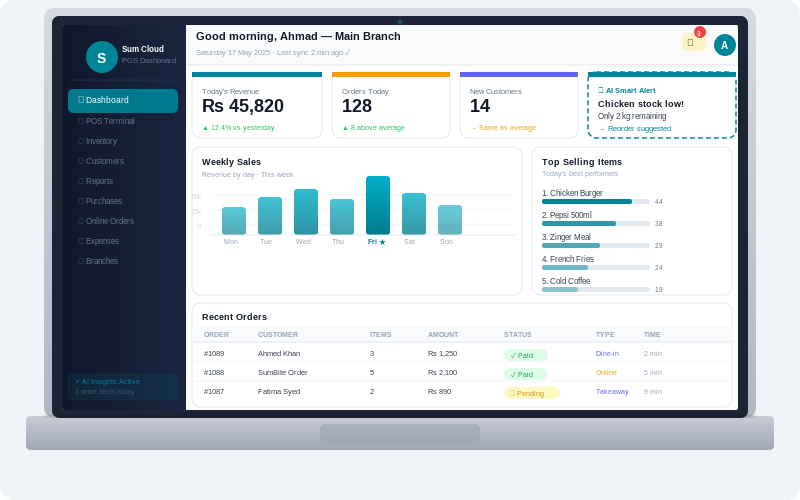
Use the dashboard for sales, stock and outlet comparisons.
Features
Supermarket capabilities
United Arab Emirates
For UAE supermarkets
Built for several checkout points and a back office that needs one version of the numbers.
High-volume checkout
A consistent till layout helps teams serve faster.
Central control
Head office reviews outlet performance from one dashboard.
AED operations
Prices and receipts stay in dirhams with configured tax rates.
Trading continuity
Offline billing on Windows keeps checkout moving during network faults.
Questions
Frequently asked questions
Next step
See Sum Cloud POS for your UAE business
Book a demo built around your workflow, or start a free trial and explore the system at your own pace.
Free trial · Setup support · Cloud and offline billing