
UK · Cloud POS
Cloud POS software for UK businesses
Your sales, stock and reports in one cloud account, accessible from the shop floor, the office or home.
Free trial available · Cloud and offline billing · Setup support
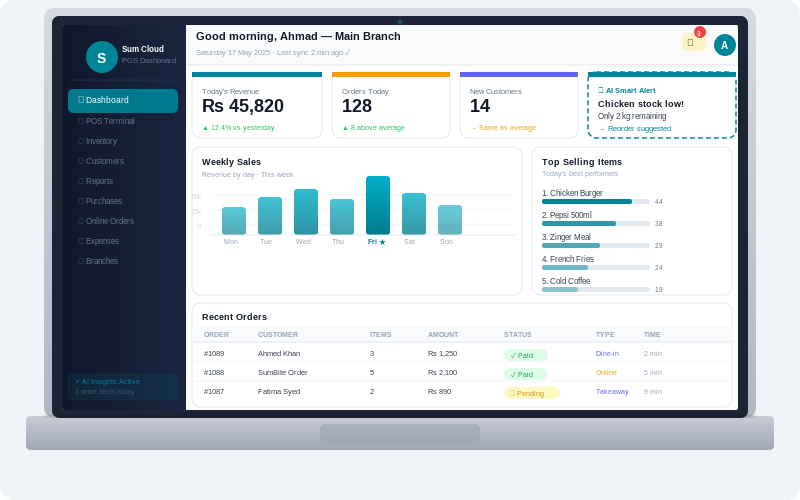
The workflow
The cloud as your system of record
A cloud POS keeps the catalogue, sales and stock in one account rather than on a single till. Owners can review trading from a browser, and the Windows desktop app provides a local billing fallback when the connection drops.
Why a cloud back office helps
Data trapped on a till
When the till holds the only copy of sales, reporting waits until someone is on site.
Slow reporting
Collecting numbers from several devices turns a simple question into an admin task.
Device dependency
Owners need access from a phone or laptop, not only the counter.
How it works
Moving to a cloud POS
Create the account
Set up the business, outlets and user roles.
Build the catalogue
Add products or menu items, prices and tax rates.
Connect devices
Use browsers, tablets or Windows tills against the same account.
Review anywhere
Check sales and stock from the cloud dashboard.
Features
Cloud POS capabilities
Start with the till and add stock, purchasing and reporting as the business grows. Every module uses the same product catalogue.
Cloud dashboard
Review sales, stock and business data from a browser.
Real-time sync
Keep devices working from the same catalogue and sales data.
Web access
Use a laptop or desktop without installing a till application.
Mobile and tablet
Use the Android and iOS apps alongside the web dashboard.
Shared catalogue
Keep products, prices and stock in one back office.
Reports
Review sales and stock without visiting each site.
United Kingdom
Cloud POS for UK operations
A browser-first system with a desktop offline mode for counters that cannot rely on constant connectivity.
Any browser
Access the back office from a laptop or desktop without a local server.
Branch overview
Compare sites from one dashboard while each till trades separately.
Offline fallback
The Windows desktop app keeps billing when the internet is unavailable.
GBP reporting
Sales and receipts stay in pounds with configured tax rates.
Questions
Questions about Cloud POS
If your question is not covered here, email info@themetasum.com and the team will reply.
Does a cloud POS need internet all the time?
The cloud is the system of record, so a connection is needed for cloud features. The Windows desktop app supports offline billing during outages.
Can I access the back office from home?
Yes. The cloud dashboard works in a browser, so owners and managers can review sales and stock remotely.
Can several people use it at once?
Yes. User accounts and roles let different staff access the parts of the system they need.
Does it work with the mobile apps?
Yes. Android and iOS apps are available alongside the web dashboard.
Related
Other UK solutions
Explore the workflow closest to your trade, or book a demo and review it with the team.
Next step
See Sum Cloud POS for your UK business
Book a demo built around your workflow, or start a free trial and explore the system at your own pace.