
UK · Restaurant POS
Restaurant POS system for UK restaurants
Run dine-in, takeaway and kitchen service from one till. Send orders to the kitchen, keep tables organised and carry on billing when the connection drops.
Free trial available · Cloud and offline billing · Setup support
The workflow
Front of house and kitchen on the same page
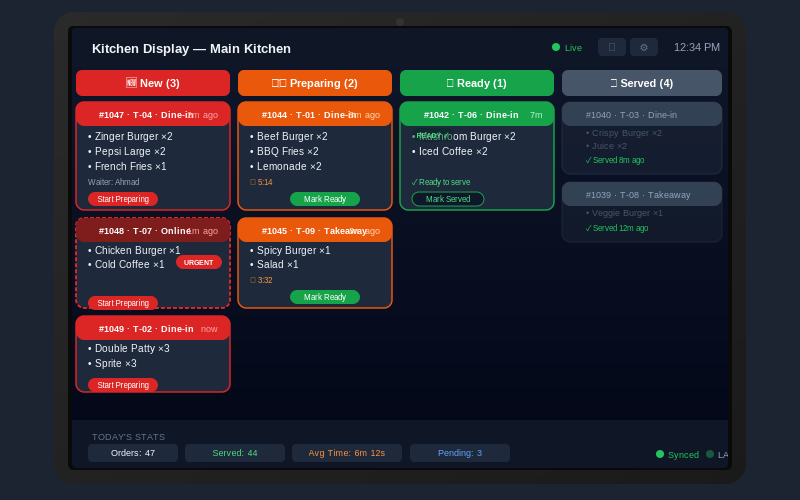
A busy restaurant needs the till, the kitchen and the pass to agree. Sum Cloud POS sends orders to a kitchen display or printer, keeps table orders together and gives owners a live view of sales across service.
Where restaurant service breaks down
Tickets get lost between till and kitchen
Paper tickets can be mislaid during a rush, leaving the pass guessing what is next.
Menu changes take too long
Price changes and new dishes should not require a late-night admin session on the till.
Peak service exposes weak systems
Slow screens and unreliable connections cost covers when the room is full.
How it works
A restaurant workflow you can train
Build the menu
Create categories, dishes, prices and modifiers such as sides or preparation choices.
Set up floors and tables
Lay out the dining room so staff can open tables and keep orders together.
Connect the kitchen
Send tickets to a kitchen display or printer for the relevant station.
Train the team
Show waiters how to take orders on the till or the TableTime waiter app.
Features
Restaurant features that matter
Start with the till and add stock, purchasing and reporting as the business grows. Every module uses the same product catalogue.
Tables and floors
Open tables, add items and keep each order attached to the right cover.
Kitchen display
Send tickets to the kitchen screen so stations can work from a clear queue.
Waiter app
Take orders at the table with the TableTime app on Android or iOS.
QR ordering
Let guests scan a code and send their order to the kitchen.
Menu and stock
Keep menu items, ingredients and stock data in the same back office.
Sales reports
Review covers, sales and product performance after service.
United Kingdom
Built around UK service styles
Dine-in, takeaway and quick service often run side by side. The till and kitchen workflow should handle all three without extra systems.
Dine-in and takeaway
Keep table orders and counter orders in one till, with the same menu and prices.
GBP receipts
Print receipts in pounds with the tax rates configured for your products.
Multi-site groups
Compare sites while each restaurant keeps its own team and floor plan.
Offline nights
Keep billing on the Windows desktop app during a connection failure.
Questions
Questions about Restaurant POS
If your question is not covered here, email info@themetasum.com and the team will reply.
Can I manage dine-in and takeaway in one system?
Yes. The till handles table orders and counter orders from the same menu, with kitchen tickets going to the same display or printer.
Does it support kitchen printers and screens?
Yes. Orders can be sent to a kitchen display system or to kitchen printers, depending on your setup.
Can waiters take orders on a phone?
Yes. The TableTime waiter app is available for Android and iOS and sends orders into the same system.
What happens if the internet fails during service?
The Windows desktop POS can continue billing offline and sync sales back to the cloud when the connection returns.
Related
Other UK solutions
Explore the workflow closest to your trade, or book a demo and review it with the team.
Next step
See Sum Cloud POS for your UK business
Book a demo built around your workflow, or start a free trial and explore the system at your own pace.