How a Restaurant POS System Works
Follow a real order — from the moment a waiter taps their phone at the table, through the kitchen display, all the way to the owner's cloud dashboard. Every step powered by Sum Cloud POS.
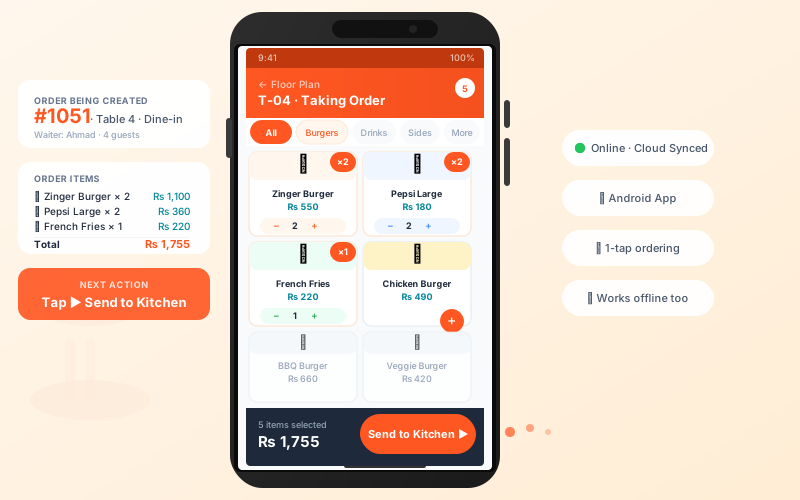
Waiter Takes the Order on Their Phone
Ahmad, the waiter, walks up to Table T-04 and opens the TableTime Waiter App on his Android phone. The floor plan shows T-04 as his active table. He taps Take Order, browses the live menu, and adds items one by one — 2 Zinger Burgers, 2 Pepsi Large, 1 French Fries. The running total updates instantly. With one tap on "Send to Kitchen", the order is transmitted in under a second.
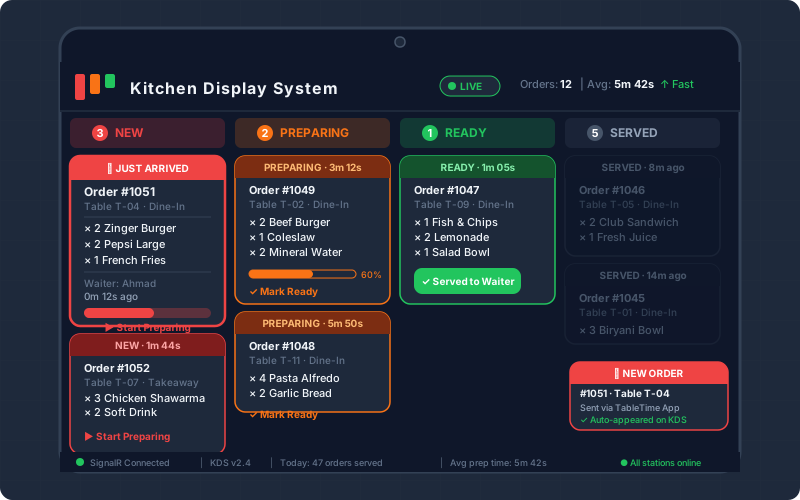
Order Appears Instantly on the Kitchen Display
The moment Ahmad taps "Send to Kitchen", the Kitchen Display System (KDS) lights up. Order #1051 lands in the NEW column with a bright red ticket, a flashing notification, and an alert sound. The kitchen staff can see every item clearly — no paper, no shouting. The KDS is powered by SignalR real-time WebSocket, so the order appears in under 500ms.
Order #1051 — Live Status Feed
T-04 · Zinger Burger ×2, Pepsi ×2, Fries ×1Kitchen Cooks & Updates Order Status
The chef taps "Start Preparing" on the KDS touchscreen — the ticket moves to the orange Preparing column and a timer starts. Every second counts. When all items for Order #1051 are ready, the chef taps "Mark Ready". The ticket turns green, and Ahmad's phone buzzes automatically with a push notification: "Order #1051 is ready for Table T-04."
- No more kitchen miscommunication or lost tickets
- Track which orders are slow — reduce average prep time
- Waiter notified automatically — no running back and forth
- KDS works even if internet drops — data syncs on reconnect
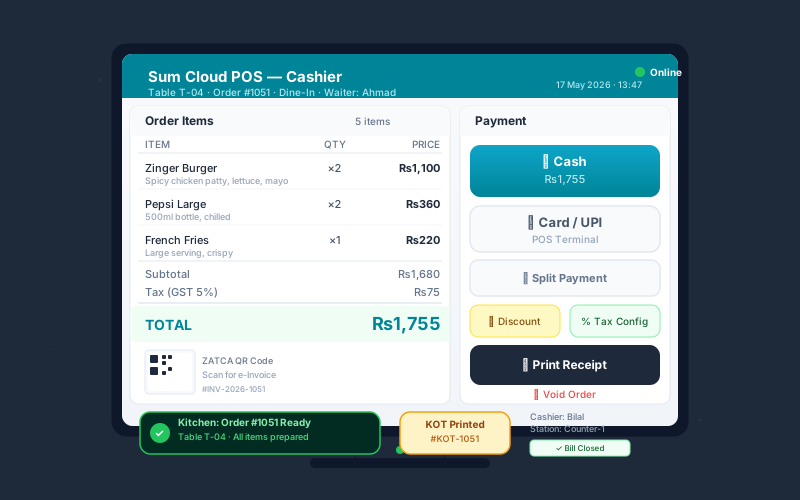
Cashier Closes the Bill in Seconds
When the customer at T-04 asks for the bill, Bilal (cashier) pulls up Order #1051 on the desktop POS billing terminal. The full itemized list is already there — no re-entry needed. Tax is auto-calculated. Bilal presses Cash, types the amount received, and the system calculates change instantly. The thermal printer fires a professional receipt with ZATCA QR code and invoice number. The table is cleared in the system.
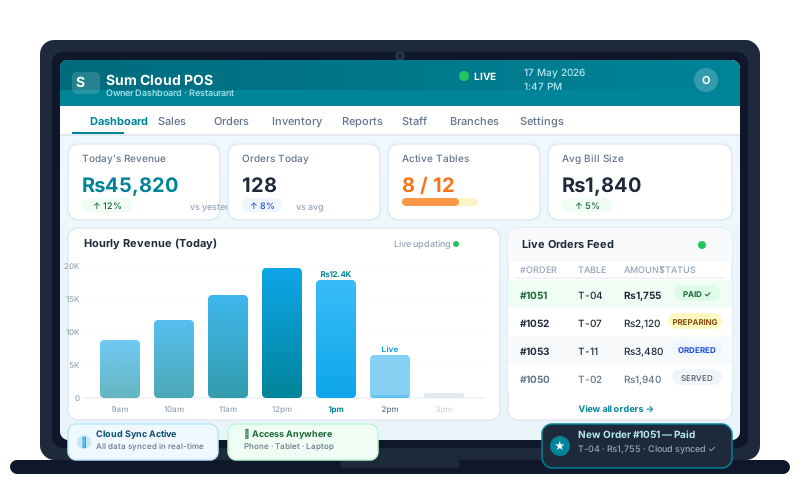
Owner Watches Everything Live — From Anywhere
The owner, sitting at home or on a second branch, opens the Sum Cloud POS web dashboard on any browser. Order #1051 appears in the live feed within seconds of being paid. Revenue charts update in real time. Active table count, average bill size, hourly sales — all live. No end-of-day surprise reports. The owner is in control 24/7.
Everything Works Together — Automatically
Sum Cloud POS is not just a billing software. It's a full restaurant operating system where every device talks to every other.
TableTime Waiter App
Android & iOS app for waiters. Floor plan view, 1-tap ordering, order modification, split bills, works offline.
Learn moreKitchen Display System
Wall-mounted or tablet KDS with real-time order tracking. 4-column kanban, prep timers, audio alerts, SignalR push.
Learn moreDesktop Billing Terminal
Windows POS for cashiers. Fast billing, cash/card/UPI, discount, KOT printing, FBR / ZATCA e-invoicing, shift reports.
Learn moreSumBite Online Ordering
Customers order online via SumBite. Orders land directly in your POS — no manual entry, no missed orders, auto-accept or review.
Learn moreCloud Owner Dashboard
Live sales, revenue charts, inventory alerts, staff activity, multi-branch comparison — accessible on any device, anywhere.
Learn moreOffline + Cloud Sync
Restaurant never stops — all apps work offline. Orders queue locally and sync to cloud the moment internet returns. Zero data loss.
Learn moreCommon Questions
About how the POS system works in your restaurant
Ready to Run Your Restaurant Like This?
Get waiter app, kitchen display, billing terminal, and cloud dashboard — all connected, all real-time. Free trial, no credit card.
Available for Pakistan (FBR), Saudi Arabia (ZATCA), Sri Lanka, Bangladesh, UK and more.