Sum Cloud Connect · SIM & WhatsApp calls · Desktop POS
See Every Customer Call on Your POS Screen — and Turn It Into an Order
Sum Cloud Connect links your Android business phone to Sum Cloud Desktop POS. When a customer calls your SIM or WhatsApp Business number, the counter sees who is calling, their saved address and order history — then starts a pickup or delivery order in one click.
What it does
Your phone rings. Your POS already knows who is calling.
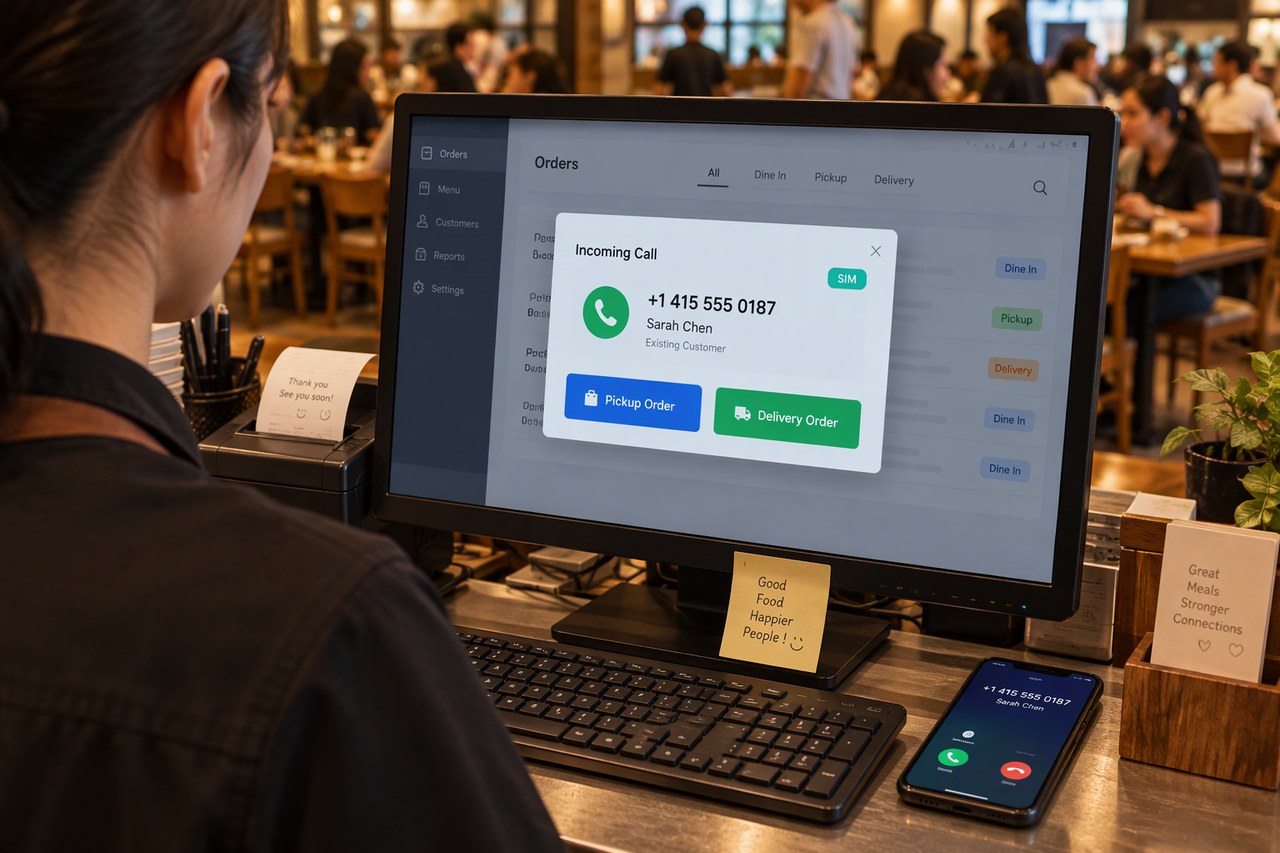
Sum Cloud Connect is the Android companion app for Sum Cloud POS. It detects incoming calls on the business phone, uploads the caller event securely, and pushes it to the desktop POS of the same company and branch in real time.
The counter no longer writes numbers on paper or asks the caller to repeat their address. The popup shows the caller number, matched customer, previous order count, last order and saved delivery address when those details exist — then hands the call straight into the existing Sum Cloud POS order flow.
Sum Cloud Connect never answers, blocks, records or listens to calls. It identifies the incoming call and opens the order screen your staff already use.
1. A customer calls
The Android phone paired with Sum Cloud Connect receives a call on your business SIM — or a WhatsApp call on your connected WhatsApp Business number.
2. Sum Cloud POS matches the caller
The caller number is checked against your customer records. Known customers arrive with history and address; unknown callers stay clearly marked as new.
3. Staff start the order
Pick Pickup Order or Delivery Order in the popup. The existing order form opens with the phone, customer and address prefilled — nothing is submitted automatically.
Features
A faster phone order, from ring to ticket
Everything the counter needs to recognise the caller, open the right order type and keep the conversation moving.
Incoming call popup
A compact desktop alert shows the caller number, matched customer, call time and status — without covering the POS workflow.
Customer recognition
See previous order count, last order summary and saved delivery address when available. Unregistered callers are labelled as new or unknown.
One-click pickup order
Open the existing takeaway workflow with the caller's phone and matched customer already selected. Add items and confirm as normal.
One-click delivery order
Launch the delivery form with the saved address prefilled when a reliable match exists. Delivery charges, taxes and permissions still follow your normal rules.
WhatsApp calls too
Inbound WhatsApp Business calls arrive in the same popup, clearly labelled WhatsApp with the provider-verified status. The same pickup and delivery actions apply.
Works while the app is closed
Android saves each call natively and uploads it in the background. The desktop popup normally appears within a second — even if the Flutter screen is not open.
Offline-safe delivery
If the phone loses its connection, the call event waits in a durable queue and uploads automatically after reconnecting. Duplicate deliveries are ignored.
Privacy by design
No microphone, call recording, call-log, SMS, contacts or accessibility permissions. Caller numbers are masked in history until revealed.
Company and branch scoped
Events are delivered only to authorised desktops of the same company and branch. Caller information is never broadcast to other tenants.
How it works
From an incoming ring to a prefilled order
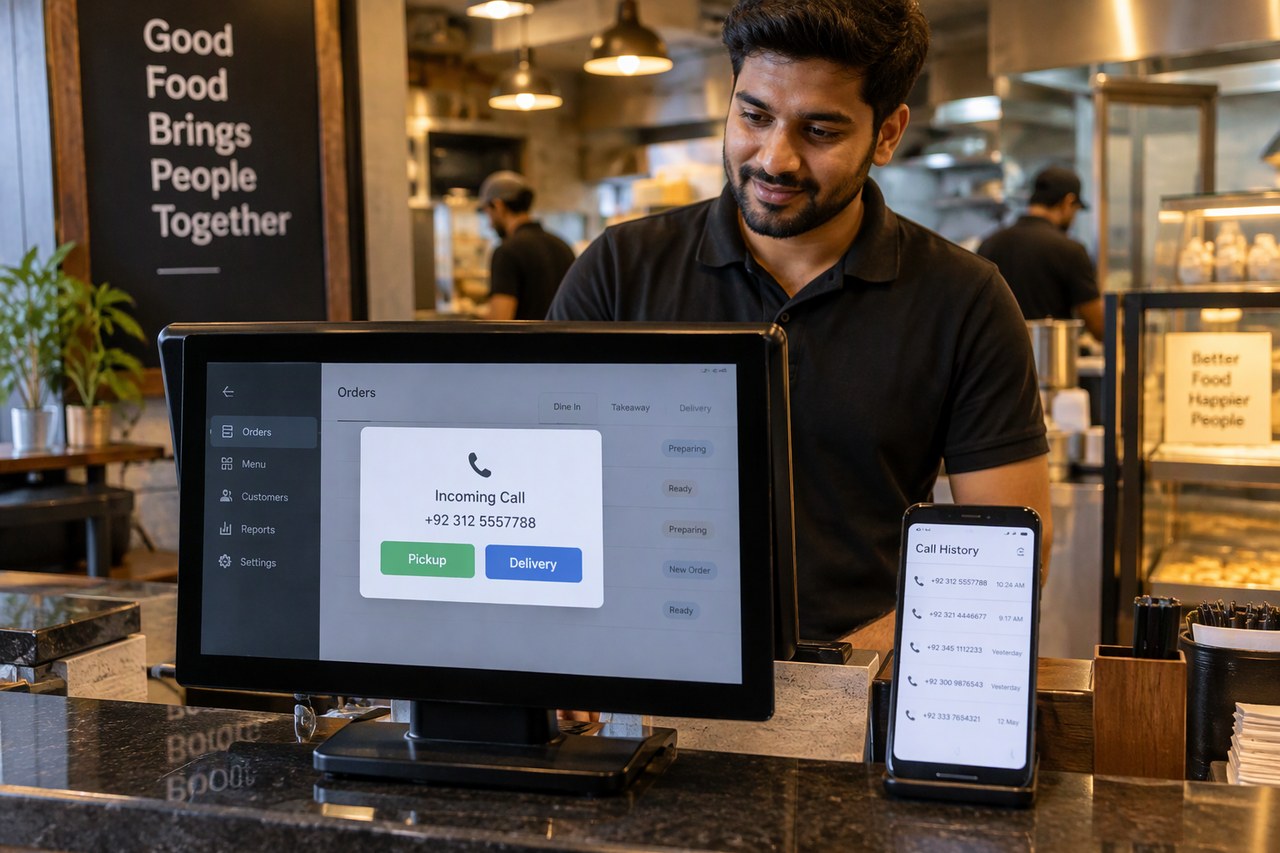
Call detection and delivery do not depend on the app screen being open. The native Android service records the event, the cloud authenticates it, and SignalR pushes it to the authorised desktop.
- The call arrives — Android's call-screening service captures the caller number when the network provides it. The call is always allowed.
- The event is queued — the call is stored durably on the phone and uploaded over authenticated HTTPS in batches.
- Sum Cloud POS delivers it — the API stores the event and SignalR notifies the signed-in desktop POS for that company and branch.
- Staff choose the order type — Pickup or Delivery opens the existing Sum Cloud POS form with caller context. Tallies, taxes, stock and payment rules remain unchanged.
Two calling channels
SIM calls and WhatsApp calls, one popup
Both channels reach the same desktop notification, with the same pickup and delivery actions. Detection works differently behind the scenes.
| Channel | How it is detected | What the popup shows | Order actions |
|---|---|---|---|
| SIM call Android app |
The Sum Cloud Connect Android app receives the call through Android's call-screening role. It always allows the call and never listens to it. | Caller number when supplied by Android, matched customer, previous order count, last order and saved address where available. | Pickup Order or Delivery Order using the existing Sum Cloud POS order workflow. |
| WhatsApp call Cloud webhook |
Meta's WhatsApp Business Platform sends a signed webhook to Sum Cloud POS. The phone app never sees WhatsApp calls. | Provider-verified WhatsApp caller number and call event, labelled WhatsApp in the same popup. | Pickup Order or Delivery Order — no audio, answering or recording inside the POS. |
WhatsApp calling depends on Meta eligibility for your business number and WhatsApp Business Platform setup. SIM call detection continues to work independently.
Privacy and permissions
Built for ordering, not surveillance
The app is intentionally limited to what an order counter needs: the fact that a call arrived, and the number Android is willing to share. It does not turn a business phone into a monitoring device.
No recording or listening
No microphone access and no call audio. The app cannot answer, reject, silence, block or record a call.
No call log or contacts
The app does not request call-log, SMS, contacts or accessibility permissions. Private and unknown callers are never given a fabricated number.
Numbers stay masked
Call history masks caller numbers until a staff member taps reveal. Logs contain event IDs and status, not full numbers or tokens.
Tenant isolation
Only authorised desktops for the same company and branch receive an event. Nothing is broadcast across companies.
Requirements
What you need to get started
- An Android business phone with an active SIM. Android 10 or newer is required to grant the call-screening role from inside the app.
- Sum Cloud Connect from Google Play installed on that phone and signed in with the same Sum Cloud POS account used at the counter.
- Sum Cloud Desktop POS signed in for the branch that should receive the calls. Events arrive in real time over the existing cloud connection.
- Optional background permissions — notifications and battery optimisation exemption let calls upload reliably while the app is closed. Both are prompted in the app and never enabled silently.
- For WhatsApp calls: an eligible WhatsApp Business Platform number, Meta webhook configuration and the WhatsApp connectivity settings in Cloud POS. Your administrator completes this from the POS developer settings.
Honest limitations
- Android may withhold a caller's number for private or unknown callers. The event is still saved; no number is invented.
- Only incoming calls are captured. Answered, ended and missed states are not reliably exposed by Android, so the popup never claims them.
- Calls from numbers saved in contacts may behave differently depending on the phone; the app does not request contacts access.
- Dual-SIM slot identification is not guaranteed.
- Force-stopping the app or aggressive manufacturer battery management can interrupt detection. The in-app diagnostics show the live status.
Who it helps
For businesses that still take orders by phone
If your team answers calls at the counter, Sum Cloud Connect removes the transcription step between the conversation and the ticket.
Works inside the Sum Cloud POS ecosystem
Connect is an add-on to the POS you already run — not a separate billing system.
Frequently asked questions
Get started
Stop writing phone orders on paper
Install Sum Cloud Connect on your business phone, sign in with your Sum Cloud POS account, and let the counter see every caller before the conversation ends.
Android 10+ · Works with Sum Cloud Desktop POS · SIM + WhatsApp calls · No call recording