Salon Appointment Booking Software with POS Billing and Staff Commission
Book, remind, check in, serve, bill and pay commission — one system for salons, barbers, spas, parlours and aesthetic clinics.
The appointment calendar lives inside Sum Cloud POS, so every visit ends in a fiscal receipt, every product sold comes off stock, and every stylist’s commission is calculated without a spreadsheet.
Salon Appointment Booking That Ends in a Bill, Not a WhatsApp Thread
Most salons in Pakistan still book through a paper diary or WhatsApp, bill on a separate machine and work out commission at month end from memory. The result is double bookings, no-shows nobody reminded, retail products that never left stock, and commission disputes. Sum Cloud POS puts all of it in one place:
- One calendar for the whole team
Day, week and list views with a column per stylist. Owners filter by branch, managers see their branch, stylists see their own day.
- Clients reminded automatically
Confirmation on booking, reminder before the visit, next-appointment alert on the stylist’s screen.
- Every visit billed through the POS
Take payment moves all services into the checkout, prints the PRA or FBR receipt and links the sale to the appointment.
- Commission computed from the bill
Percentage, fixed, tiered or target-based policies accrue automatically and settle from a payment account with a full statement per stylist.
What the module includes
Opt-in modules: switched on per shop in Settings → POS Settings → Modules. Reports → Commission Report appears when Commission is on.
Everything a Salon Needs to Run Appointments
Built from how salons, barbers and clinics in Lahore, Karachi and Islamabad actually work
Staff Calendar: Day, Week and List
A column per stylist, colour per staff member and per service, status chips on every card. Filter by staff, service or status; cancelled and no-show visits stay behind a filter so the day stays readable.
- Day, week and list views
- Open any appointment from its card
- Branch picker for owners, home branch for staff
- Reschedule dialog with free-slot picker
Multi-Service Appointments
One booking holds haircut + colour + blow-dry. Each service line has its own stylist, optional assistant with a share, duration, buffer, price and discount, and the lines run back-to-back automatically.
- Per-service staff and assistant
- Duration and buffer per service
- Line discounts and totals
- “Haircut +2 more” summary on old screens
4-Step Booking Wizard
Client → Services → Staff → Time → Review. Search an existing client or type a walk-in and save them as a client, pick services with live prices, choose a stylist or “Any available”, then pick from the free slots shown.
- Walk-in with “Save as a client”
- New client created without leaving the wizard
- Book again from any past visit
- Edit and reschedule before the visit starts
Smart Availability, No Double Booking
Free slots come from each staff member’s weekly hours, breaks, blocked time, approved leave, public holidays, the services they are skilled for and their existing bookings. A clash is refused with the reason shown.
- Working hours per weekday with breaks
- Blocked time: training, prayer, personal
- Service skills per stylist
- Manager override: “Book anyway”
Appointment Lifecycle
Scheduled → Confirmed → Checked in → In progress → Completed, with Cancelled and No-show (with a reason) available until the work starts. Every step is time-stamped, and a billed appointment can no longer be changed.
- Check-in and start-service buttons
- No-show and cancellation reasons
- Billed appointments locked
- Own appointments only for junior staff
Reminders and Next-Appointment Alerts
Confirmation email when a booking is made or confirmed. Reminder email to the client a chosen number of minutes before, plus an in-app notification to the stylist. A toast and a header chip show “Next appointment 3:30 PM” 15 minutes ahead.
- Reminder lead time per shop (e.g. 60 min)
- Runs every 5 minutes on the server
- Dashboard alerts: next, overdue, unbilled, unconfirmed
- Never blocks a booking if email is down
Salon Dashboard
Appointments by status, sales (gross, returns, net) and the share that came from appointments, new vs returning clients, the next ten visits, staff workload with utilisation %, a trend chart and commission earned, pending, approved and settled.
- Branch and staff filters
- Role-based: sales figures only with permission
- Alerts list with one-tap actions
- Same dashboard in the mobile app
Clients: New, Returning, Upcoming
Every client with total spend, visits, first and last visit, no-shows and their next appointment. Open a client to see every appointment and every bill. “Created on” and “Created by” show who added the client.
- Segments: all, new, returning, upcoming
- Sort by last visit, spend, visits, name
- History drawer: appointments + sales
- Book again straight from the client
Staff and Schedules
Mark who is bookable, give each stylist a colour and display order, set seven-day working hours with breaks (falls back to the payroll shift), choose the services each person can perform, and block time off.
- Hours source: staff, payroll or default 9–9
- Blocked time, leave and holidays respected
- Per-staff stats: appointments, revenue, commission
- Service settings: duration, buffer, bookable, colour
See the Whole Salon Day at a Glance
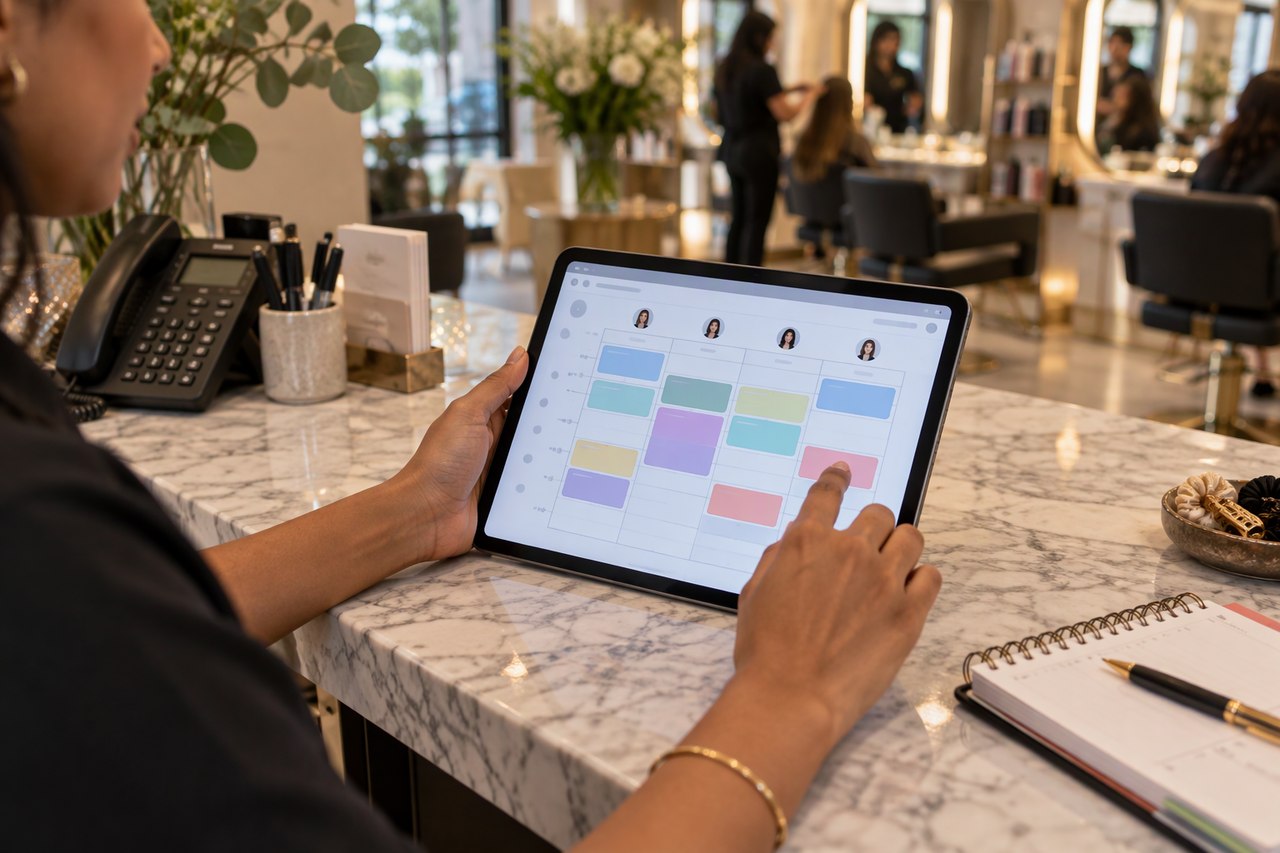
The calendar is the reception desk. Every stylist has a column, every booking is a coloured card with the client, services and status, and the free slots are the gaps you can book into. Nothing is hidden in a paper diary or a separate WhatsApp chat.
- Day, week and list views with a column per stylist and colour per staff member and service.
- Drag to reschedule or open the reschedule dialog and pick from the free slots the system offers.
- Status chips for scheduled, confirmed, checked in, in progress, completed, cancelled and no-show.
- Filters by staff, service and status, so cancelled visits and no-shows stay out of the way.
- Branch picker for owners; every stylist opens on their own day in the mobile app.
Take Payment Straight Into the POS Checkout
When the service is done, one tap on Take payment opens the Sum Cloud POS sales screen with the client selected and every service of the appointment already in the cart at the current price. Add shampoo or serum from the shelf, apply a package discount, split the payment between cash and card, and print the receipt.
- Fiscal receipt every time
PRA eIMS for Punjab salons, FBR digital invoicing for goods, SRB and KPRA where you operate. QR code on the receipt.
- Linked both ways
The sale shows the appointment, the appointment shows the invoice and is marked billed. A second payment for the same visit is refused as a probable duplicate.
- “Served by” pre-filled
The main stylist is pre-selected in the payment popup for commission; the cashier can change it when someone else did the work.
- Works in the mobile app too
Take payment hands the appointment to the mobile POS, every line included, with the same link back and the same 409 protection.
The visit, step by step
Staff Commission Software for Salons: Policies, Approvals, Settlements
Commission is its own switch, so a retail shop can use it without appointments and a salon can combine both. Policies are versioned, every accrual is a ledger entry you can audit, and settlements post to your accounts as a Commissions expense, never as a customer sale.
Reports and statements
- By staff: earned, pending, approved, settled and outstanding per stylist and branch.
- By item and policy: which services and products drive commission, and which policy paid it.
- Targets: achieved vs target per period with the bonus earned, materialised when the period is settled.
- Own statement: every stylist can open their own statement with opening balance, entries, settlements and closing balance, on web or in the mobile app.
- Preview calculator: test a policy against a sample sale before activating it; editing an active policy keeps history and never recalculates old entries.
Who earns: an appointment service line pays its stylist (and assistant). Any other line pays the salesperson chosen at checkout, else the appointment’s main stylist, else the cashier. Retail shops see the picker labelled “Salesperson”, service businesses see “Served by”.
Owner, Manager, Cashier and Stylist See Different Things
Two permission groups ship with the module, and the built-in roles get sensible defaults you can change in the role editor.
| Permission | What it allows |
|---|---|
| Appointment Dashboard | Open the salon dashboard |
| Dashboard Sales | See sales, revenue and commission totals on the dashboard and staff stats |
| Appointment View | See every staff member’s appointments in the branch |
| Appointment Manage | Create, edit, reschedule, cancel, change any status, take payment |
| Appointment Clients | Open the clients list and client history |
| Staff Schedule | Edit working hours, blocked time, staff services and service durations |
| Commission Setup / Approve / Settle / Report | Manage policies, approve entries, pay settlements, run reports |
| Commission Own Statement | A stylist reads their own statement only |
The Same Appointments in the Android and iOS App
Open the Sum Cloud POS app and the Home quick action switches from Items to Appointments when the module is on. Phones get a focused day list; tablets get the full day grid.
- Today tab with staff workload
One card per stylist with their count, next client and utilisation, so the floor manager sees who is free.
- Full wizard with client step
Walk-in save-as-client, new client form, services, staff, time and review, the same rules as web.
- Offline cache and outbox
Appointments are stored on the device; changes made offline show “Not synced yet” and send themselves when the network returns. A pending-changes sheet shows what is still queued.
- Payment through the mobile POS
Take payment hands every service line to the mobile checkout with a durable link back; a duplicate is refused.
- Commission on mobile
Policy editor, approvals, settlements, reports and the stylist’s own statement, all native.
- Company settings aligned
Modules, reminder minutes, slot step, invoice numbers and notifications are edited from the app with the same owner/manager guard as web.
Set Up Salon Appointments in 3 Steps
From a fresh account to a working calendar in an afternoon; our team does it with you on WhatsApp
Turn the modules on
Settings → POS Settings → Modules: switch on Appointments (and Commission if you pay it), set the reminder lead time and the slot step. Only an owner, admin or manager can change these.
Add services, staff and hours
Service durations and buffers, which stylists are bookable, their colours, weekly hours and breaks, and the services each person performs. Commission policies if you use them.
Start booking and billing
Reception books in the wizard, stylists check clients in from their own list, the cashier takes payment through the POS, and the owner watches the dashboard from the phone.
Built for Every Business That Books Staff Time
Any business that books clients into staff time can switch the Appointments module on
PRA Registered Salons Get Fiscal Receipts From the Same Checkout
Beauty salons, spas and parlours in Punjab are taxable service providers under the Punjab Revenue Authority. Because the appointment ends in the Sum Cloud POS checkout, every billed visit is submitted to PRA eIMS automatically with a QR-coded fiscal invoice, and the monthly return report is ready without extra work. Karachi salons file to SRB, Peshawar salons to KPRA, and goods go to FBR, all from the same sale.
Salon & spa suite
Complete the Suite Around Appointments
Appointments is the front door. These guides cover the modules that turn a booked visit into commission, repeat clients and a compliant receipt.
Salon Appointment Booking Software: Frequently Asked Questions
Fill the Calendar, Stop the No-Shows, Pay Commission Without Arguments
Appointments, POS billing and staff commission in one cloud account, on the web and in the app.
Free setup by our team on WhatsApp. Works on the phone and laptop you already own.