Mobile KDS · Android & iOS
Mobile Kitchen Display System — Every KOT on Any Device, In Real Time
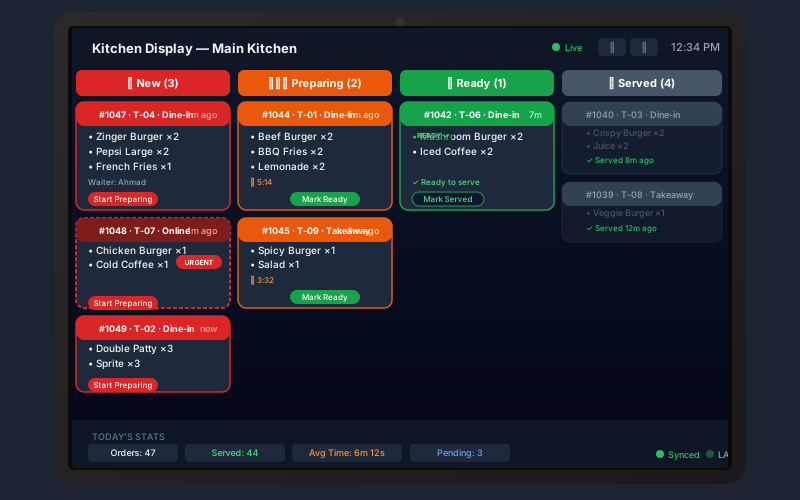
Mount a cheap Android tablet in your kitchen and it becomes a full kitchen display screen. The Sum Cloud POS Mobile KDS app shows live order tickets, highlights running orders, and triggers Bluetooth or WiFi thermal printing — all without a dedicated kitchen PC.
Features
Everything a mobile KDS needs to run a busy kitchen
Real-Time Ticket Push
Every order placed at the POS counter, via waiter app, or through online ordering appears on the mobile KDS screen within seconds — no polling, no refresh needed.
Running Order Priority
When a table sends a second or later KOT for a party already seated and eating, it is flagged as a Running Order with a red badge and an alert sound — kitchen knows to prioritize it immediately.
KOT Template Builder
Drag-and-drop blocks to design your KOT print layout. Choose which fields to show, reorder sections, pick paper size (58mm/80mm/A4), and preview live before saving.
Bluetooth & WiFi Printing
Connect a Bluetooth thermal printer for automatic KOT printing. WiFi network printers are also supported. Auto-print on ticket arrival — no kitchen staff interaction needed for printing.
LAN Bridge Sync
When internet is down, the LAN bridge (UDP/TCP) connects the mobile KDS directly to the desktop POS over your local WiFi network — orders still reach the kitchen without cloud connectivity.
Item Status Tracking
Kitchen staff tap individual items to mark them prepared. Status updates broadcast back to the waiter app and POS counter so everyone knows what is in progress and what is ready.
Sound Alerts
Distinct audio alerts for new orders vs. running orders — so the kitchen can distinguish urgency without looking at the screen. All sounds are configurable in the app settings.
Offline Queue
KOTs received during brief outages are queued locally and flushed when connectivity returns — ensuring no ticket is ever lost even during network hiccups.
Any Android or iOS Device
No proprietary hardware. Use a low-cost Android tablet mounted on the kitchen wall, or an old iPad — the app runs on any device that can install apps from the Play Store or App Store.
Unique Feature
Running Orders — the feature that changes rush-hour service
A running order is a second or later KOT for a table that already has guests seated and eating. These orders must be prepared urgently because guests are already waiting for their next course.
- Automatic detection — no manual flagging by staff
- Bold red RUNNING ORDER badge on the KDS card
- Distinct audio alert (different from new order sound)
- Running orders sorted to the top of the display
- Printed on KOT for kitchen reference
Frequently asked questions
Get started free
Put a live kitchen display in your kitchen — for free
Start your Sum Cloud POS free trial, install the mobile KDS app on any Android or iOS device, and your kitchen is live within minutes.
Mobile KDS · Real-time KOT · Bluetooth printing · Android & iOS