Windows POS · Offline First
Windows Desktop POS That Keeps Selling — With or Without Internet
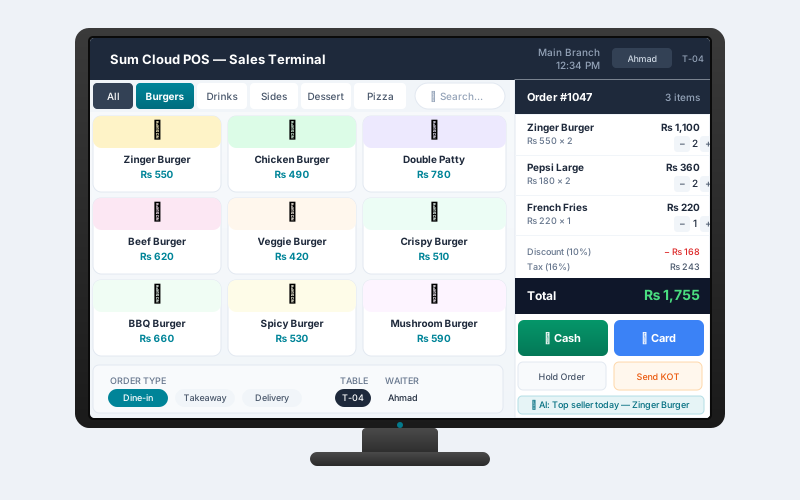
The Sum Cloud POS desktop app runs natively on Windows 10 and 11. Touch-optimized checkout, thermal printing, and delivery order management — fully offline when your connection drops, cloud-synced when it returns.
Features
A complete Windows POS — no compromises
True Offline Billing
The desktop app stores your entire product catalog and customer list locally using SQLite. Internet or not — billing never stops. All offline sales sync automatically when connectivity returns.
Touch-Screen Optimized
Large buttons, swipe gestures, and a clean touch-first layout make the checkout flow fast on any touch display. Works equally well with a mouse and keyboard at a standard counter.
Thermal & Receipt Printing
Connect any USB or network thermal printer. The custom receipt template builder lets you add your logo, change fonts, and rearrange the receipt layout — no coding required.
Cloud Sync
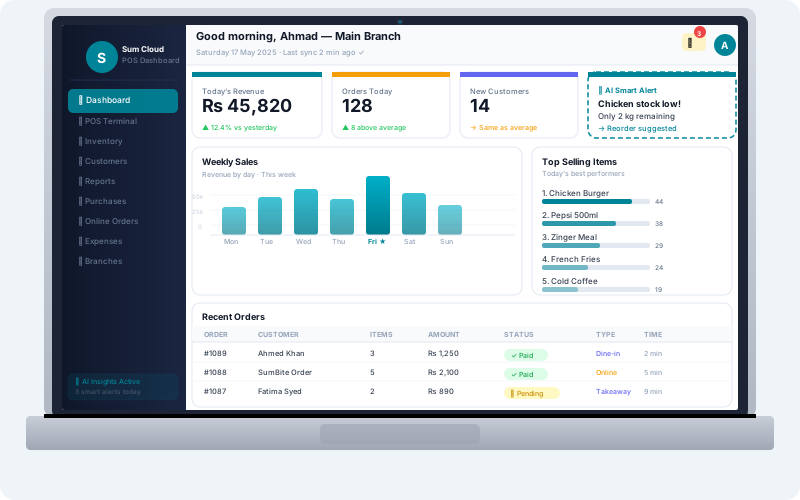
Products, customers, and promotions sync down from the cloud. Every sale syncs up — so your web dashboard always shows live data across all branches and terminals.
Delivery Order Management
Built-in delivery flow: search customers by phone, assign delivery charges per customer, track delivery orders, and sync payment status — fully offline-capable and cloud-synced.
Online Orders (SumBite)
An integrated online orders panel shows incoming SumBite orders at the counter. Accept, set ETA, reject, and toggle your restaurant live/offline — all from the desktop app.
Customer Ledger & Credit
Record customer credit sales, receive payments offline, view full transaction ledger, and print payment receipts — all without internet, synced when online.
Discounts & Customer Rates
Apply rule-based discounts, promotional codes, or per-customer static discount rates. Discount amounts are automatically deducted at checkout when the customer is selected.
FBR & Tax Ready
Tax rules, VAT rates, and FBR invoice formatting are all configurable. Every receipt prints with the correct tax breakdown — keeping you compliant without extra work.
Offline-First Architecture
Why offline matters for POS
Internet outages during peak hours cost businesses real money. The Sum Cloud POS desktop app is built offline-first — the cloud is the system of record, but the counter never waits for a server response.
- Full product catalog stored locally with SQLite
- Pending sales queued and batch-synced on reconnect
- Customer data, credit balances, and discount rules all local
- Delivery orders taken and stored offline, synced later
- LAN bridge keeps kitchen display working without cloud
Requirements
System requirements
Operating System
Windows 10 (1903 or later) or Windows 11. Both 32-bit and 64-bit editions are supported.
Hardware
4 GB RAM minimum (8 GB recommended). Any modern processor. Touch screen optional but recommended for POS counter use.
Printers
USB, Bluetooth, and network thermal receipt printers supported. 58mm and 80mm paper widths. Label printers for product stickers also compatible.
Frequently asked questions
Download now
Start selling on Windows — online and offline
Create your free Sum Cloud POS account, then download the desktop app from your dashboard. Setup takes under 10 minutes.
Windows POS · Offline billing · Thermal printing · Cloud sync · Pakistan & global