Waiter App · Android & iOS
TableTime — The Restaurant Waiter App That Keeps Every Table Moving
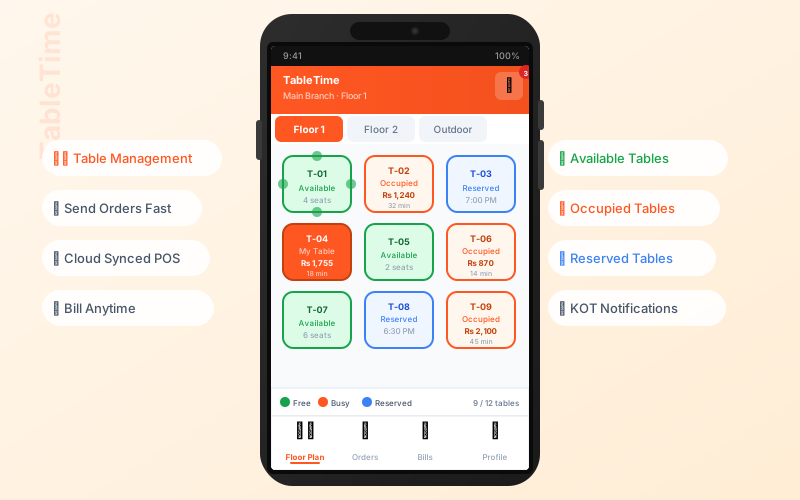
Give your floor staff a powerful ordering tool on their own phone or tablet. TableTime connects waiter orders directly to the kitchen in real time — no paper slips, no shouting across the floor, no missed items.
Features
Everything a waiter needs in their pocket
TableTime gives floor staff a complete ordering toolkit — faster service, fewer errors, and a direct line to the kitchen.
Table-Side Order Taking
Waiters browse the full menu, add items, set modifiers, and place orders directly from their Android or iOS device — no trips back to a fixed terminal.
Interactive Floor Plan
A live floor map shows which tables are occupied, free, or waiting. Waiters select a table, see its order history, and manage the full dine-in cycle with a tap.
Real-Time Kitchen Sync
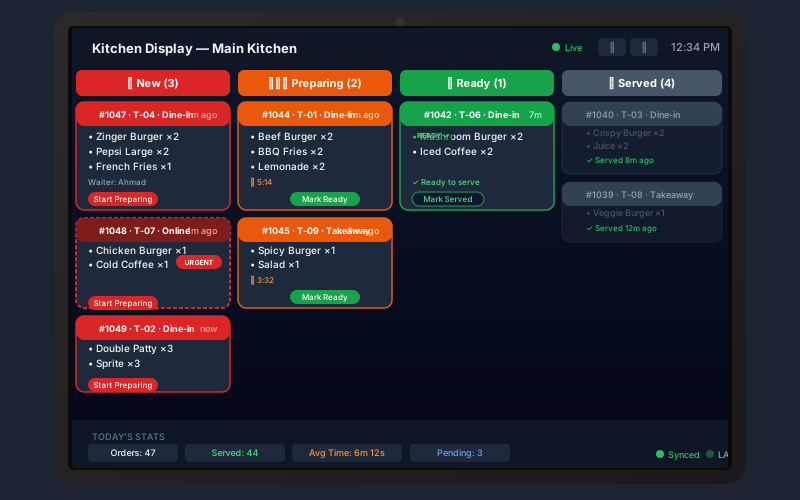
Every order fires to the kitchen display system (KDS) and prints a KOT ticket the moment the waiter confirms it — zero delay, zero miscommunication.
Full Digital Menu
The latest menu — categories, items, prices, descriptions — always in sync with the cloud POS. Changes made in the admin panel appear on every waiter device instantly.
My Stats — Waiter Performance
Each waiter sees their own sales totals, order counts, and tips for any period. Managers can compare performance across the team to incentivize top performers.
Offline & LAN Support
Menu items are cached locally so the app keeps working when internet drops. A LAN bridge connects directly to the desktop KDS over WiFi for uninterrupted kitchen communication.
Multi-Language Support
TableTime supports English, Urdu, and Arabic so your staff can work in the language they're most comfortable with — no training friction.
Multi-Waiter, Multi-Branch
Each waiter logs in with their own credentials. The app automatically scopes orders to the correct branch — essential for restaurant chains and multi-location groups.
Bill & Payment Ready
Waiters can view the running bill for any table, split or merge orders, and signal the counter for payment — keeping guests happy and tables turning faster.
Workflow
From table tap to kitchen ticket in seconds
TableTime is designed to eliminate the slowest parts of dine-in service — walking to a terminal, re-entering orders, and verbal kitchen communication.
- Waiter opens the app — the floor plan loads with live table status.
- Selects a table — existing orders for that table are visible immediately.
- Adds items from the digital menu — categories, modifiers, special notes.
- Confirms the order — KOT fires to the kitchen display and/or printer instantly.
- Guest is ready to pay — waiter raises the bill from the same app.
Why TableTime
Built for real restaurant conditions
Works on low-cost Android devices — no expensive hardware needed
Kitchen sees every order within 1 second of waiter confirmation
Paper KOT slips are replaced by digital tickets — reducing lost orders
TableTime app is free to download — bundled with your POS subscription
Part of the Sum Cloud POS ecosystem
TableTime works seamlessly with every other component of your restaurant setup.
Frequently asked questions
Get started free
Deploy TableTime in your restaurant today
Create your free Sum Cloud POS account, download TableTime from the App Store or Play Store, and your waiters are taking orders table-side within minutes.
No credit card · Waiter app included · Android & iOS · Pakistan & MENA