
Offline-First · Real-Time Cloud Sync · LAN Bridge

Offline Billing + Real-Time Cloud Sync — Never Lose a Sale Again

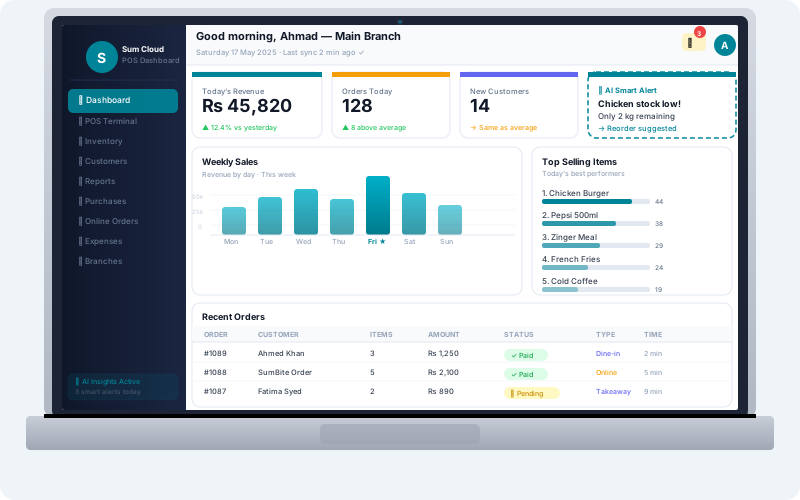
Sum Cloud POS is built offline-first. Every sale, every order, every invoice is saved locally on your device — internet or not. When you're back online, everything syncs to the cloud in real-time. Your business never stops because of an internet outage.
Works without internet Auto cloud sync LAN bridge Free trial
Offline Online Cloud Sync POS Dashboard

How It Works

Offline + Online Sync — Step by Step

Three distinct layers ensure your data is always safe, always available, and always in sync — no matter what happens to your internet connection.

1
Local SQLite Storage — Always On
Every transaction is immediately written to a local SQLite database on your Windows POS device. No internet required. This is your primary data store — fast, reliable, always available.
2
Sync Queue — Smart Batching
When internet is unavailable, all changes join a sync queue. The queue tracks what needs to be sent to the cloud — orders, payments, inventory updates, customer records. Nothing is lost.
3
Cloud Sync — Automatic on Reconnect
The moment your internet returns, the sync queue flushes automatically. All pending data uploads to the cloud dashboard. Your reports, inventory, and customer records update in real-time.

LAN Bridge Technology

Local Network Sync — No Internet Needed

Even without internet, your devices stay connected over local WiFi. The LAN Bridge creates a TCP/UDP server on your local network — so your waiter app, kitchen display, and POS terminal all communicate in real-time without needing the internet.

  • KOT orders from waiter app reach kitchen display over LAN — no internet
  • Mobile KDS receives tickets from Desktop POS over local WiFi
  • Multiple POS terminals sync transactions over LAN within same branch
  • Automatic LAN discovery — devices find each other without manual configuration
  • Falls back to internet sync when devices are on different networks
  • Sync status indicator shows online / offline / syncing state in real-time
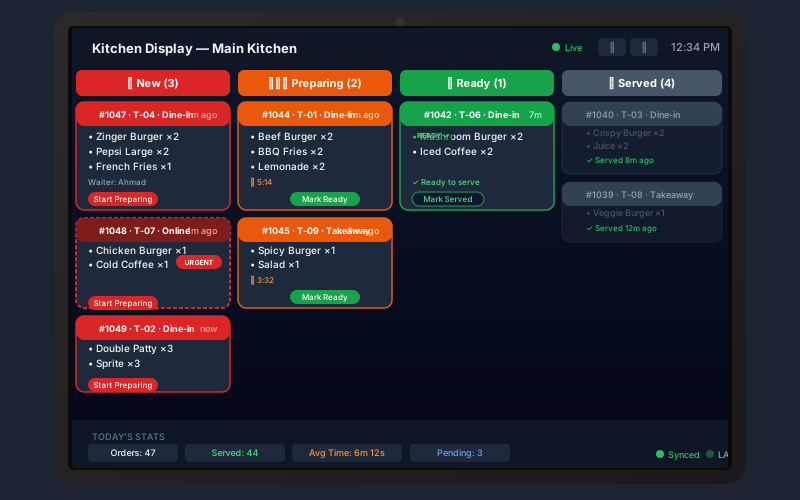
LAN Bridge Kitchen Display Sync

Technical Architecture

Built for Reliability — In Any Network Condition

Sum Cloud POS uses enterprise-grade synchronization architecture that works reliably in Pakistan, Saudi Arabia, UK, and anywhere internet quality varies.

SQLite Local Database
Full relational database on-device. All menu data, customer records, and transactions stored locally for instant access.
SignalR WebSocket Push
Real-time KOT push from POS to kitchen display via SignalR WebSocket. Order appears on kitchen screen in under 1 second.
LAN TCP/UDP Bridge
Desktop POS runs a TCP server (port 55800) and UDP broadcast (port 55799) for local device discovery and data sync.
Smart Sync Queue
Outgoing changes queue locally and flush to cloud in the correct order when connectivity is restored. No duplicate records.
Auto Reconnect
System automatically detects internet reconnection and begins sync. No manual action needed — you just bill and it handles the rest.
Real-Time Sync Indicator
Visual status bar shows current connection state — online, offline, or syncing — so staff always know the current status.
Mobile App Offline Cache
Waiter app and management app cache menu data locally. Orders can be placed even when internet is briefly unavailable.
Cloud Dashboard Always Current
Once sync completes, your cloud dashboard shows accurate, current data — reports, inventory, sales — from every device.

Frequently Asked Questions — Offline + Cloud Sync

Nothing stops. The Desktop POS continues billing normally using the local SQLite database. All transactions are saved locally. When internet returns, everything syncs automatically — no manual action needed, no data loss.

Yes. The LAN Bridge connects the POS terminal, waiter app, and kitchen display over local WiFi (TCP port 55800). Orders are pushed to the kitchen screen in real-time even without internet — as long as all devices are on the same local network.

Yes. The TableTime waiter app caches menu data locally. Orders can still be taken on the tablet when internet is temporarily unavailable. They sync as soon as connectivity is restored, and over LAN they can still reach the kitchen display.

No. The sync queue uses unique transaction IDs and idempotent operations — re-syncing the same transaction is safe. The cloud recognizes already-synced records and skips them, preventing duplicates.

Offline-First · Real-Time Sync · LAN Bridge

Never Lose a Sale to Internet Downtime Again

Sum Cloud POS works offline by design. Bill without internet, sync in real-time when connected, and keep your kitchen running over LAN. Free trial — no card required.

Free trial · Offline billing · Auto cloud sync · LAN bridge · Zero data loss